In 2022, we decided to get rid of our 27-inch iMac, try something new, and not buy a replacement desktop. Instead, we opted for iPads with keyboards and tried using those as our main personal computers. To log in to work, I would use my office laptop directly, eliminating the need for a desktop.
Everything was good and simple until I realized I needed a bigger screen for work. My eyes were getting tired of the small laptop display, so I bought a 24-inch Dell monitor. I made sure it had a USB-C display port so I could connect it to my laptop via USB-C. I also knew that if I eventually decided to buy a PC or Mac, I would still be able to use the monitor.
Everything was good and simple—again—until I started missing the 27-inch display of my old iMac. So, I decided to buy a 27-inch Dell monitor. The initial plan was to replace my 24-inch monitor, but this new one had a USB-C display port and also supported daisy-chaining another monitor via a separate USB-C cable. That’s when I decided that instead of getting rid of my 24-inch monitor, I could just use both—creating a setup similar to my office, except with two differently sized monitors.
I use the larger monitor as my main screen and the smaller one when I need to share my screen during work calls. If I were to share from the 27-inch display, many of my colleagues wouldn’t be able to read the text, as it would appear too small on their screens—even on the 24-inch monitors we use at work.
To complete the setup, I also got a few accessories and connected them to my monitors, allowing me to use them with whichever laptop, iPad, or PC/Mac I connect. I bought a high-end keyboard and mouse from Logitech (Logicool in Japan), lights from BenQ, and a headset from Microsoft. I also picked up a cheap 4K camera from EMEET. I didn’t mind going cheap on the camera since I hardly use it anyway, but it’s good to have just in case. To tie everything together, I also got a black leather desk mat from Itoya.
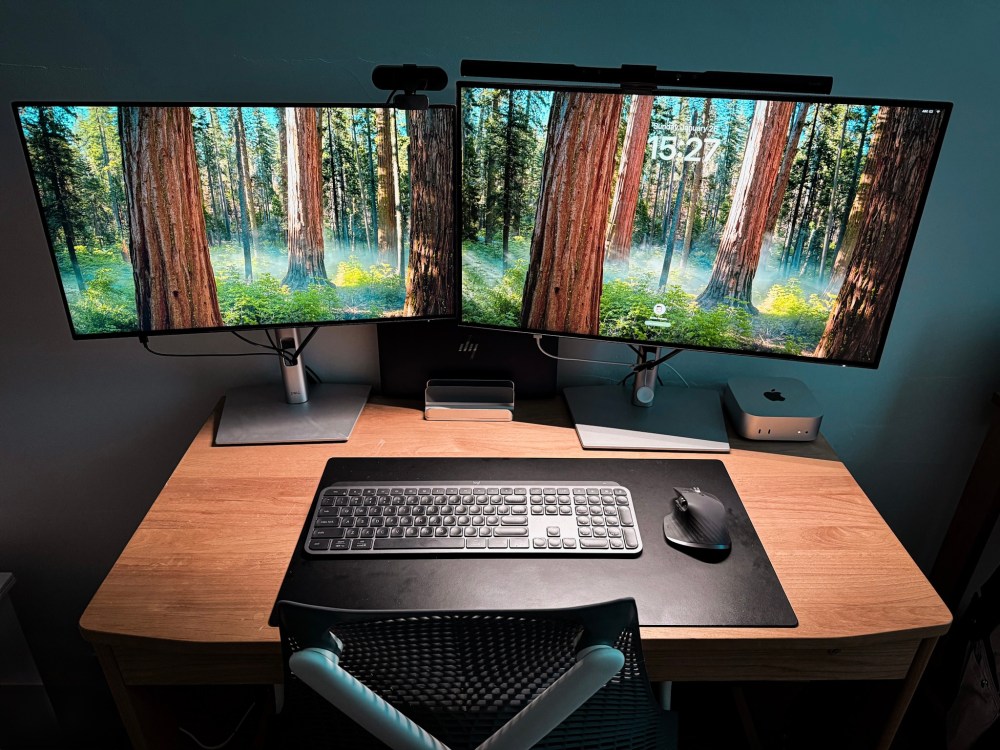
With my setup nearly complete, I debated whether to get a MacBook Air or a Mac Mini as my return to the Mac. I ultimately chose the Mac Mini, as it fit perfectly into my setup—I could simply connect it to my monitor. The timing was perfect, as Apple had just released the Mac Mini M4. Now, I seamlessly switch between my Mac and my office laptop.
Looking back, it seems like I’ve been gradually building my setup in preparation for a return to the Mac. And now that I have my Mac Mini M4, my setup feels complete.
At least for now.
 Enrico in Tokyo