My Message Scrambler App have supported iAd since I released version 2.0, which I released in March 2014. For version 2.3, I was planning to add a feature to permanently remove the iAd using In-App Purchases (IAP). This tutorial from Ray Wenderlich was very useful when I was implementing this, and I would highly recommend it.
The idea is that when an iAd is shown, I would show a “close” icon near the iAd so when user tries to click on it, it would show a message box where user could either “Remove ads” or “Restore purchase”. See screen shot below. If no iAd, then no “close” icon.
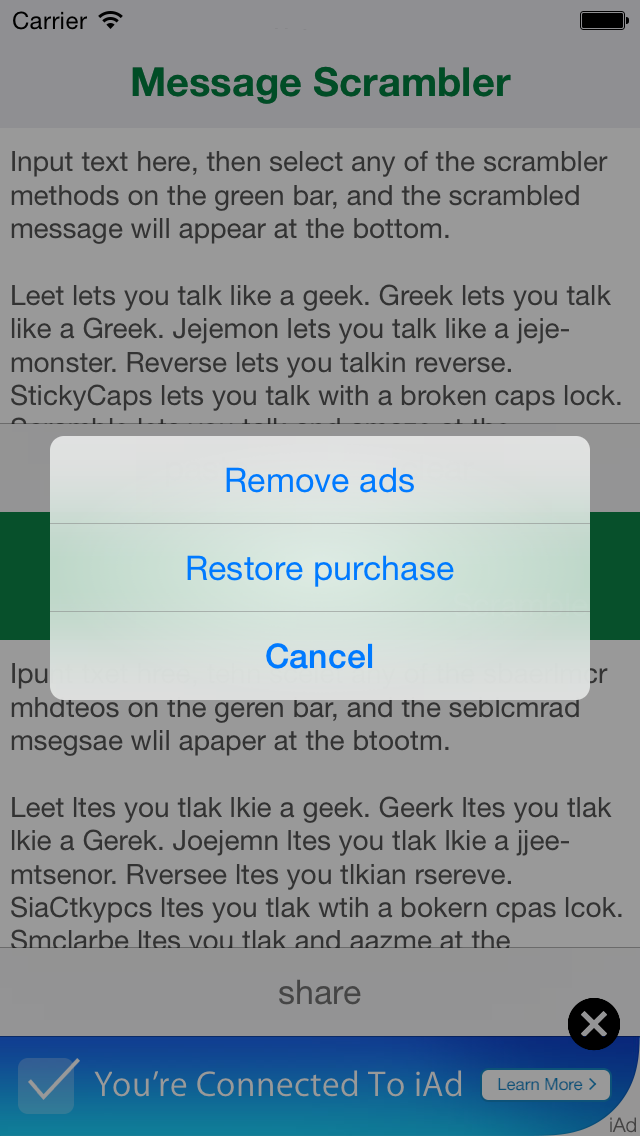
New feature to permanently remove adsIt worked fine on my device and I am able to buy and restore purchases using a test account. Problem is after I submitted the app to the App Store, it looks like the iAds are not showing on their device. As the ads don’t show, they cannot launch the message box above, and thus, cannot test the In-App Purchase.
I’m pretty sure the iAd itself works because I’ve had it since May 2014. I can also confirm from the iTunes Connect iAd Network, that my app is registering requests and I do have impressions everyday, but of course only for countries that iAd support.
I am currently having a discussion with the tester, and hope he/she would be able to show the iAd’s and confirm the In-App Purchase (IAP) soon.
 Enrico in Tokyo